
Description
The programming of the NICE ONE 4E remote control is simple and requires no special equipment.
COMPATIBLE with:
- NICE FLOR-S1
- NICE FLOR-S2
- NICE FLOR-S4
- NICE ON3EBD bi-directional
22.46€
 Fast delivery !
Product in stockOrder processed on Thursday 29 October 2026
 Batteries* and instructions included
* Batteries included for gate and garage remote controls.
 Technical service at your service
 14 days to change your mind




The programming of the NICE ONE 4E remote control is simple and requires no special equipment.
COMPATIBLE with:
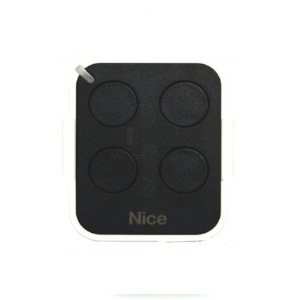
The NICE ON4E remote control is a transmitter designed for the comfortable management of your automation systems, gate motors, and garage doors. This black and white casing can easily be programmed through self-learning.
This remote control is equipped with 4 black buttons and features a compact and elegant design. In fact, its casing has dimensions of 56 x 45 x 10 mm (length x width x thickness). It operates with CR2032 batteries on a frequency of 433.92 MHz. With its excellent features, this remote control model is an essential accessory for controlling your motorized systems and automation.
You can complete your order with peace of mind by benefiting from a one-year warranty offered by Alloremotecontrol to its customers on all its products. Even better, an opportunity to add a second year of additional warranty is offered to you at the time of finalizing your order (see T&Cs).
Choosing the perfect gate remote control is not an easy task. That said, by opting for the NICE ON4E remote control, you will have everything to gain.
This NICE remote control model is certainly among the most compact gate remote controls. This reduced size, combined with a simple and clean aesthetic, gives us a small device with a truly charming appearance. But these features especially facilitate handling, storage, and transport of this remote control. It will be very easy for you to place this gate fob in your bag, pocket, or on your keychain. You can then have it constantly within reach.
If you don’t want to complicate your life with a gate remote control that has too elaborate a function, then the NICE ON4E remote control is perfect for you.
First of all, this device only has 4 control buttons. This number is more than sufficient for the task for which this device was designed. It greatly improves the readability of the device. It must be said that a gate remote control with too many buttons could disorient the user.
The programming of this device is done through self-learning. This system is well known for facilitating this programming procedure. You won’t even need to call a technician to do it.
Some gate remote control models shine in their maneuverability and ease of use. But it is in terms of durability that they may fall short. Fortunately, this is not the case with the NICE ON4E remote control.
This small transmitter has been made from high-quality electronic components and materials. Therefore, this remote control will ideally withstand regular and long-term use, the effects of wear, as well as any shocks caused by accidental drops. One thing is for sure, you won’t have to change your gate remote control for a long time.
Programming is an essential step before the first use of a new gate remote control. It allows pairing the remote control device with the receiver of your motorized and automated equipment.
And as already mentioned, the programming of the NICE ON4E remote control is done through self-learning. It will therefore be very simple to perform. You can do it either by using an old remote control that is already functional on your gate receiver or by using the receiver directly.
You can also refer to the programming video for this remote control, which explains how to program the first two buttons of this remote control:
| BRAND | NICE |
|---|---|
| REFERENCE | ONE-4E |
| HEIGHT | 56 |
| DEPTH | 10 |
| WIDTH | 45 |
| NUMBER OF BUTTONS | 4 |
| BUTTONS COLOUR | BLACK |
| CASE COLOUR | BLACK/WHITE |
| FREQUENCY | 433.92 |
| SWITCH | 0 |
| BATTERY/POWER | CR2032 |
| PROGRAMMING TYPE | SELF LEARNING |