
Description
IMPORTANT INFORMATION: Your SIMU TSA HZ 2 remote is now obsolete! We are now delivering the new remote SOMFY KEYTIS NS2.
Programming the SIMU TSA HZ 2 remote is simple and requires no special equipment.
29.90€
 Fast delivery !
Product in stockOrder processed on Monday 14 September 2026
 Batteries* and instructions included
* Batteries included for gate and garage remote controls.
 Technical service at your service
 14 days to change your mind




IMPORTANT INFORMATION: Your SIMU TSA HZ 2 remote is now obsolete! We are now delivering the new remote SOMFY KEYTIS NS2.
Programming the SIMU TSA HZ 2 remote is simple and requires no special equipment.
Do you need a new remote control for managing your automation? A reliable and easy-to-use device to make your daily life a little easier? Look no further! The Alloremotecontrol site has the accessory you need: the new remote control SIMU TSA HZ 2, a remote control that meets your expectations in terms of operation!
The SIMU brand offers you its new remote control SIMU TSA HZ 2, an accessory designed for your motors, whether for a garage door, a gate, or many other automations. This remote control ensures both security within your home and great power and range. Indeed, the remote control SIMU TSA HZ 2 operates on a frequency of 433.42 MHz. An ideal accessory for your home! Additionally, this remote control is a durable transmitter powered by CR2430 batteries, which will be delivered directly with it. For more convenience, you can also reorder your batteries on our site Alloremotecontrol. Finally, you will have no trouble programming your new transmitter, as the coding type is done through self-learning! In just a few minutes, you can use your remote control on your automations.
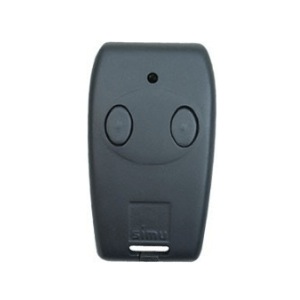
In terms of aesthetics, the remote control SIMU TSA HZ 2 is presented as follows: it is a sleek, black rectangular case, very simple and discreet. On the front, there are 2 black buttons, representing the two control channels of the transmitter.
Its small size offers a good grip: 72 millimeters in height, 41 millimeters in width, and only 13 millimeters in thickness. An object you can slip anywhere without being encumbered. A nice bonus is that it can be directly attached to your keychain.
As a guarantee of quality and to fully satisfy its customers, the Alloremotecontrol site now offers a one-year warranty on all its products for sale. Even better, you can opt for a second additional year of warranty when placing your order (see our General Terms of Sale). All you have to do now is order your new accessory!
Upon receiving your new remote control, you will also find a user manual to help you set it up. Here are some initial instructions to assist you in your process:
Setting up from an already programmed remote control:
You have just set up your accessory, but it doesn’t seem to be working? After several attempts, you still can’t activate it? Don’t wait any longer and contact us directly through our customer service. Visit the Alloremotecontrol website; we are here to assist you as quickly as possible and resolve your issues. You can contact us by email at: [email protected] or by phone at: 08 99 25 30 57
| BRAND | SIMU |
|---|---|
| REFERENCE | TSA_HZ_2 |
| HEIGHT | 72 |
| DEPTH | 13 |
| WIDTH | 41 |
| NUMBER OF BUTTONS | 2 |
| BUTTONS COLOUR | GREY |
| CASE COLOUR | GREY |
| FREQUENCY | 433.42 |
| SWITCH | 0 |
| BATTERY/POWER | CR2430 |
| PROGRAMMING TYPE | SELF LEARNING |