Description
Control your automation systems with ease using the remote control CARDIN S435 TX2 BLUE. Thanks to the user-friendly remote control CARDIN S435 TX2 BLUE, managing your motors and controlling your access will become remarkably easy. Programming is done simply by following the procedure described in the manual, provided with your remote control or downloadable from our site.
Presentation of the CARDIN S435 TX2 BLUE Remote Control
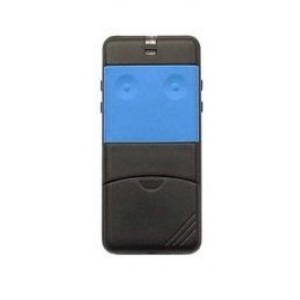
The CARDIN S435 TX2 BLUE remote control is designed for controlling automation and motorization of gates and garage doors. This black casing is programmable via self-learning. This device offers a good grip and features 2 blue buttons. It operates with 12V batteries on a frequency of 433.92 MHz.
The advantage of Alloremotecontrol
This 2-channel transmitter is durable and perfectly suited for residential use. As a guarantee of quality and to fully satisfy its customers, Alloremotecontrol offers a one-year warranty on all its products. Even better, you can opt for a second year of additional warranty when placing your order (see T&Cs).
Attention: Despite its similar appearance, do not confuse the CARDIN S435 TX2 BLUE with the following models:
- The CARDIN S438_TX2 device (switch coding)
- The CARDIN S 435_gray transmitter (remote control with gray buttons)
- The CASALI A252 beep, green buttons.
Programming the CARDIN S435 TX2 BLUE Remote Control
To program your CARDIN remote control using your receiver, please follow these steps:
- First, open the radio receiver (follow the antenna wire to locate the radio receiver).
- Then, press the push button. It may be labeled with the following letters: MEMO, REC, ENR, or PROG, on the radio board. For some receivers, you just need to press the MEMO button once and release it. For others, you must hold the MEMO button down.
- A light on the radio board will turn on or blink.
- Then, press the button on your new remote for 1 second.
- Next, release the button. Wait for the light on the radio board to turn off.
- Finally, test the remote control and close the radio receiver.
- Congratulations! Your remote control is ready to use.
FAQ about the CARDIN S435 TX2 BLUE Remote Control
Is this remote control usable in a co-ownership?
In co-ownership, this remote control can sometimes be difficult to code. Please inquire with your property manager to find out if the receiver is locked or not.
Where to find other products from the CARDIN brand?
You can find other products from the CARDIN brand on Alloremotecontrol by clicking the link here
Why buy this product on Alloremotecontrol?
- First, know that your satisfaction is our priority. We will handle your product with great care.
- Next, your order will be shipped the same day
- Then, a 1-year warranty is offered (possible extension up to 2 years – see T&Cs)
- Finally, phone assistance (08 99 25 30 57) or email support ([email protected]) is available 5 days a week

 Fast delivery !
 Batteries* and instructions included
 Technical service at your service
 14 days to change your mind