Description
Control your automated access reliably and securely with this remote control MPSTL4 from the manufacturer Prastel. Thanks to the very user-friendly remote control MPSTL4, managing your motorizations and controlling your access will become incredibly easy. Programming is done simply by following the procedure described in the manual, provided with your remote control or downloadable from our site.
Presentation of the Prastel MPSTL4 Remote Control:
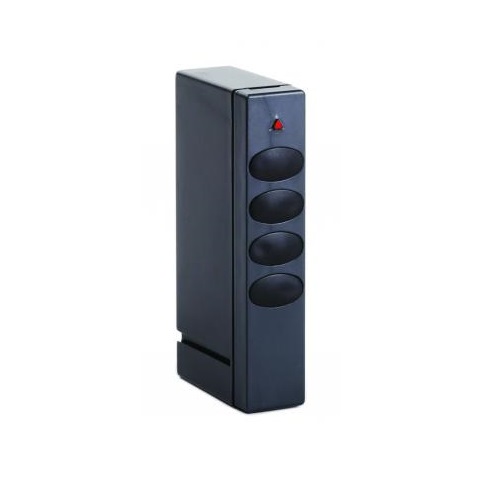
The Prastel MPSTL4 remote control is designed to control your automation systems and your gate and garage door motors. This black casing is programmable via self-learning. It is replaced by a new generation remote control operating at a frequency of 40.685Mhz, just like the original product, and is perfectly compatible.
It offers a good grip and has 4 black buttons. It operates with a 12V(23A) battery at a frequency of 40.685MHz. It is a durable 4-channel transmitter that allows you to control up to 4 automation systems.
The Prastel MPSTL4 is quick and easy to program thanks to its self-learning feature. We invite you to consult the manual available for download by clicking on “View the manual” and to read the section “How to program your Prastel MPSTL4 remote control.”
Compatibility of the Prastel MPSTL4 Remote Control:
The Prastel MPSTL4 is compatible with the Prastel MPSTL1 and the Prastel MPSTL2.
Frequently Asked Questions about the Prastel MPSTL4 Remote Control:
How to change the batteries of your new remote control?
If you notice that your Prastel remote control is starting to weaken, it’s time to change the batteries. To do this, simply slide the panel located at the bottom of the remote control. Once you have access to the battery, remove it and place the new one, respecting the indicated polarity. If you wish, you can purchase replacement batteries by clicking here: Duracell 12V 23A Batteries
How to program your remote control if you live in a condominium?
If you live in a condominium, you may not be able to program your remote control. Indeed, the condominium may reserve the right to block the registration of remote controls. To be sure, contact your condominium management.
Technical question or information?
Feel free to contact our technical service by phone at 08 99 25 30 57 or by email at: [email protected]
How to program your Prastel MPSTL4 remote control?
Using an existing remote control:
- With a pointed object, press the hidden button on the back of your already programmed remote control or the programming button next to the battery.
- The LED of the remote control lights up, wait 5 seconds until the LED goes out.
- Within 10 seconds, press the button to be programmed on your new remote control.
- Wait 10 seconds
- And there you go, your new remote control is programmed
Using the receiver of your motorization:
- Open the casing of your receiver
- Press the programming button of your receiver (PGM), the LED of the receiver lights up, release the button.
- Within 10 seconds, press the button to be programmed on your new remote control
- Wait 10 seconds
- And there you go, your new remote control is programmed
Technical Specifications:
- Frequency: 40.685MHz
- Number of buttons: 4 buttons
- Number of channels: 4 channels
- Type of coding: Self-learning (fixed code)
- Battery: 12V(23A)
- Dimensions: 75(h.) x 38(l.) x 15(p.) mm
- EAN: 3662615747670
Why buy the Prastel MPSTL4 remote control from Alloremotecontrol?
- Free shipping for the purchase of 2 remote controls or more
- Shipping of your order on the same day
- Free test batteries
- 1-year warranty included (extension possible up to 2 years – see T&Cs)
- Phone support (08 99 25 30 57) or by email ([email protected]) available 5 days a week

 Fast delivery !
 Batteries* and instructions included
 Technical service at your service
 14 days to change your mind