Description
ATTENTION, IMPORTANT INFORMATION: CAME has stopped the production of this kit and removed it from its catalog. It is now replaced by the new model reference 8K01MB-009 that we deliver to you and which is perfectly equivalent.
Trust in the made-in-Italy quality with the CAME brand. With the CAME FERNI FER40K01 kit, you will benefit from a motorization for double-leaf gates with a maximum size of 4 m per leaf and a maximum weight of 800 kg.
Presentation of the CAME FERNI FER40K01 kit
Enjoy the best of the CAME brand with the CAME FERNI FER40K01 kit. With this system, you will benefit from a motorization for a double-leaf gate with a maximum size of 4 m per leaf and a maximum weight of 800 kg.
Set up your motorization
With this CAME FERNI FER40K01 kit, you get the CAME ZM3E control cabinet.
To program and configure your gate as you wish, the CAME ZM3E control cabinet should suit you. With it, you can modify various parameters such as the speed of your motorization or the closing time of your leaves.
Two remote controls with two frequencies
Inside this kit, you can enjoy two CAME TOP432EE remote controls (806TS-0121). These have the particularity of having two channels and being programmable via self-learning. Thus, they can be directly recorded in the memory of the receiver.
An easy-to-program radio card
With the CAME AF43S radio card, the Italian brand provides you with a powerful device to control your motorizations and automation safely. This receiver operates on a frequency of 433.920 MHz with a 12 V/24 V (AC/DC) power supply. This product has two channels and is easy to program thanks to mixed coding.
A long-range antenna
Included in this CAME FERNI FER40K01 kit, the CAME TOP A433N antenna will allow you to have an increased range for your remote control. Functional with a frequency of 433.92 MHz, this will change your life by increasing the base range of your remote control by 50 to 100 meters.
Included infrared photocells
With the CAME FERNI FER40K01 kit, you will receive the CAME DIR10 photocells. These photocells have an infrared range of 10 meters. Powered by a current of 12 or 24 Volts, these photocells can stop the action of your motorization if an obstacle is in its path. No more worries about the safety of your environment!
For even more safety, you also have in this kit the CAME KLED signaling light. This indicates, with a flashing yellow light, the presence of an individual on the path to your home.
Details of the CAME FERNI FER40K01 kit
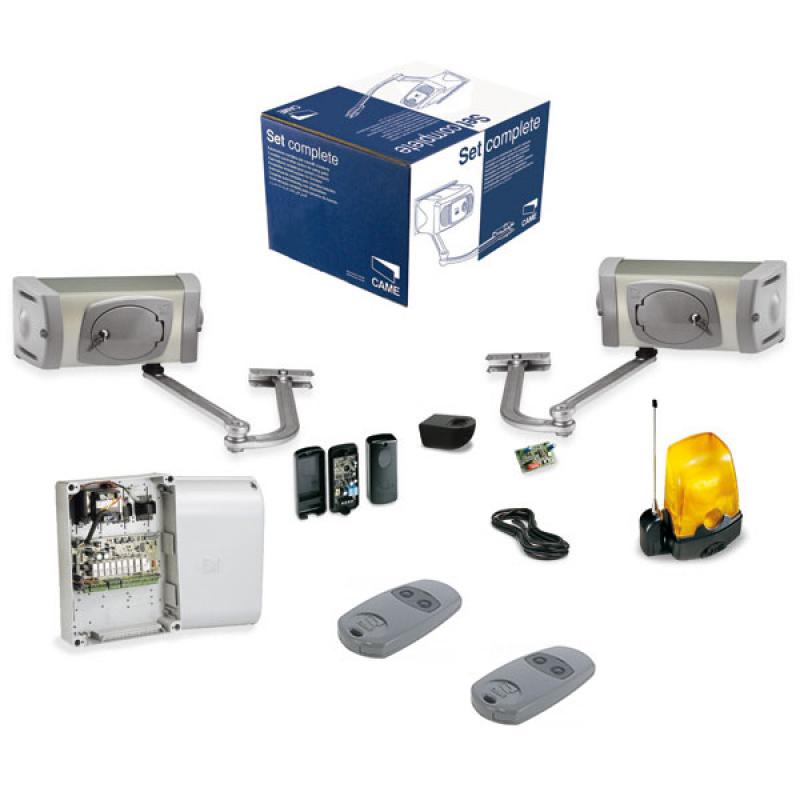
Inside this kit, you will find the following parts:
- Two CAME FERNI FE40230V operators, with articulated arms
- A CAME ZM3E type electrical cabinet
- Two remote controls CAME TOP432EE, 2 multi-purpose channels at 433.92 MHz
- A pluggable radio card CAME AF43S
- An antenna CAME TOP A433N
- 5 m of cable for connecting the antenna
- A set of photocells CAME DIR10 with a range of 10 m
- A flashing signaling light CAME KLED
- A support for the flashing light for wall mounting CAME KIAROS
- A gate plate
- A complete technical manual
Installation of the CAME FERNI FER40K01 kit
How to program your CAME ZM3E control cabinet?
You can find out about the different ways to program this control cabinet by consulting the product PDF manual by clicking here
To program the CAME TOP432EE remote control
Before you can use this remote control, it is first essential to configure its buttons and pair it with the receiver of your motorized and automated gate. The programming is managed by a self-learning coding system. This procedure is therefore easy to perform. You can use either a pre-programmed remote control or use the receiver of your motorized and automated gate.
For more information, we invite you to consult the PDF manual of this product here
To program my pluggable radio card CAME AF43S
WARNING: DANGER OF ELECTROCUTION. THIS PRODUCT MUST ONLY BE HANDLED OR INSTALLED BY QUALIFIED PERSONNEL.
For more information on programming your receiver, we invite you to consult the product programming manual on our site by clicking here
How to program my remote control to my receiver:
- Open the radio receiver (follow the antenna wire to locate it).
- Press the push button on the receiver. It is identifiable because it is labeled MEMO; REC; ENR; PROG on the radio card (for some receivers, you just need to press the MEMO button once and release it. For others, you need to hold the MEMO button down).
- A light on the radio card lights up or blinks.
- Press the button on your remote control for a second and then release it.
- Wait for the light on the radio card to turn off.
- Test the remote control and close your radio receiver.
- Congratulations! Your remote control is now programmed.
Installation of the CAME DIR10 photocells
To program your CAME DIR 10 photocells, you must:
- First, position them facing each other
- Fix the photocells at a height of about 50 cm from the ground.
- Provide, if necessary, the housing for the base for recessed mounting and fix it
- Secure the housing to the wall or base using the provided screws and any necessary plugs
- Finally, select the type of power supply and make the necessary connections.
Attention: to remove the card, only force on the indicated side. Secure the cover.
For more information, we invite you to consult the manufacturer’s manual here
How to install the CAME KLED flashing light
For more information and details on the procedure to follow, you can consult the PDF user manual on our site by clicking here
To install this flashing light, you must:
- Prepare the necessary power supply cables.
- Open the flashing light (A) and drill the base from the bottom (B).
- Pass the cables from the cabinet through the hole. Then, secure the base of the flashing light to pillar C using the appropriate screws and plugs.
- Connect the wires to the flashing light’s card.
- Close everything up.
To configure your CAME TOP A433N Antenna
For more information regarding the installation of this antenna, we invite you to consult the manufacturer’s manual here
FAQ of the CAME FERNI FER40K01 kit
Where can I find other products from the CAME brand?
You can find other products from the CAME brand on Alloremotecontrol by clicking the link here

 Fast delivery !
 Batteries* and instructions included
 Technical service at your service
 14 days to change your mind