Description
Note : This product is now replaced by the BFT MITTO COOL models.
Attention : Non-contractual photo
Programming the BFT Mitto 2 remote is simple and requires no special equipment.
If you live in a condominium, it is possible that the receiver has been locked. Check before ordering this remote.
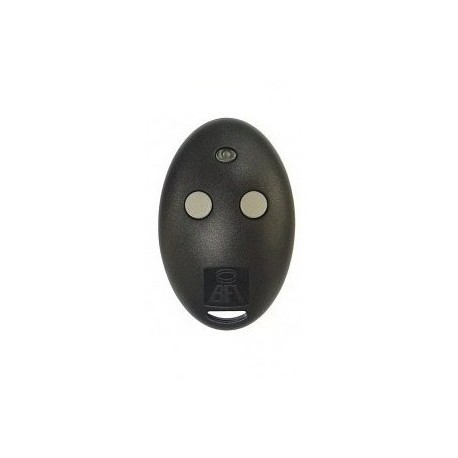
BFT Mitto 2M Remote Control
The programming of this BFT Mitto 2 remote control can sometimes be complicated, especially in a collective installation.
The BFT Mitto 2M remote control is a small device that allows for the remote control of a motorized gate equipped with a receiver. Thus, the use of this gate remote is relevant on many occasions. This is the case, for example, when you are driving your car in front of your home. No need to get out of your vehicle and manually open the gate. You just need to press one of the buttons on your new gate remote BFT Mitto 2M.
Features of the BFT Mitto 2M Remote Control
The BFT Mitto 2M remote control is a 2-channel model operating on a frequency of 433.92 MHZ. This remote will allow you to control two motorized and automated gates at once. Of course, both devices must be of the same frequency and brand as your new gate remote model.
This gate remote is powered by a 12 V alkaline battery. It has been designed to consume very little energy. Thus, you won’t have to replace the battery for a long time.
The remote has a rather sober aesthetic with its oval shape, the gray color of its buttons combined with the black color of the casing. This Mitto 2M model is available in 2 buttons, but also in a 4-button model compatible with BFT TRC1, TRC2, and TRC4.
For those living in a co-ownership, it is important to check if the receiver has been locked before purchasing the BFT Mitto 2M. Indeed, programming the BFT Mitto 2M may require access to the receiver. It is compatible with the BFT CLONIX 4 RTE receiver.
The BFT Mitto 2M Remote Control is Easy to Set Up
Setting up the BFT Mitto 2M is accessible to everyone. A programming manual will still be provided to assist you in this task. The programming of this gate remote can be done in 3 ways:
- Set up the new BFT Mitto 2M remote using a pre-programmed remote:
In this case, you need to be within one meter of the receiver box of the motorized gate. You will need to have the pre-programmed remote as well as the new BFT Mitto 2M remote.
If the programmed remote has a hidden button, you will need to press it for one second using a paperclip. If it does not have one, you will need to press both buttons of the programmed remote until the indicator light turns on.
You will then need to press the button you want to copy. In this case, the motorization system should not activate. If it does, you must start the process over from the beginning.
Finally, you will also need to repeat the above steps for each button of the new BFT remote. Once that is done, you just need to wait for 60 seconds before testing.
- Set up the new BFT Mitto 2M via the receiver without a digital screen
– To set up the new BFT Mitto 2M via a receiver model without a digital screen, you will need to open the receiver box. First, press the SW1 button located on the motherboard of the receiver. Then, you will only release the button when the small light on your receiver starts blinking.
– You will then need to press the hidden button on the new gate remote or, if there isn’t one, the two buttons on the top. The receiver light will activate again and will stay on this time. Finally, you will need to press the left button. The receiver light will start blinking again for 5 seconds before turning off.
– This maneuver only concerns the left button of the new gate remote. For the right button, you will need to repeat each of the above steps, pressing the SW2 button instead of SW1. When the programming of each button is complete, you will need to wait 10 seconds before testing if the device works correctly.
- Set up the new BFT remote via the receiver with a digital screen
Some models of motorized gate receivers have a digital screen. Thus, there is no need to open the receiver box to program or set up your new motorized gate remote.
– You will just need to navigate to the radio menu of the control logic and press the OK button. The PARAR option will appear on the screen.
– By pressing the minus – button, the LOGIC option will appear on the screen.
– By pressing the minus button again, the RADIO option will display.
– By pressing the OK button, the AJOUTER START option will appear on the screen. You will need to press the OK button again to display the TOUCHE CACHEE option.
– You will then need to press the hidden button on your new remote. If there isn’t one, just press both buttons of the motorized gate remote. You will only stop pressing this or these buttons when the receiver screen displays the word RELACHER.
– The screen will then display the TOUCHE DESIREE option. You can then press the button to be programmed on the new motorized gate remote. You will only release it when the receiver screen displays OK. Note that this maneuver must be repeated to program or set up the second button.
This remote model boasts excellent build quality
This gate remote has been made from high-quality electronic components as well as solid and durable manufacturing materials. Thus, the BFT Mitto 2M will withstand regular and long-term use perfectly. It will also withstand potential shocks. Therefore, you won’t have to replace it for a long time.
The BFT Mitto 2M Remote Control is Easy to Store and Transport
With a height of 64 mm, a thickness of 16 mm, and a width of 41 mm, this BFT motorized gate remote has the ideal dimensions. It is neither too small nor too bulky. It will easily fit in your hand and find its place in your pocket, bag, glove compartment, etc. You can also attach it to your keychain. That said, this model of motorized gate remote is still large enough not to get lost easily.
Specifications:
Brand: BFT
Reference: MITTO 2
Button color: Gray
Casing color: Black
Dimensions: 64 x 16 x 41 mm (Height x thickness x width)
Power supply: 12 V battery
Frequency: 433.92 Mhz
Coding type: self-learning

 Fast delivery !
 Batteries* and instructions included
 Technical service at your service
 14 days to change your mind