Description
Note : This transmitter replaces the device SUPERIOR HOTEL PLUS (SUPCU004)
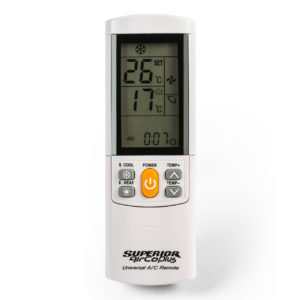
The SUPERIOR AIRCO PLUS remote control (SUPCU001) will allow you to control your air conditioning remotely and works entirely like the original remote control. It is easy to use and simple to program thanks to its self-learning feature.
Presentation of the SUPERIOR AIRCO PLUS Remote Control
The SUPERIOR AIRCO PLUS remote control is a universal air conditioning remote. It is programmable through self-learning. It offers a good grip, features a backlit screen with 13 gray buttons. It works with 1.5V batteries(LR03-AAA).
This universal remote is dedicated to remotely controlling the operation, stop, and adjustment of an air conditioner. It can copy up to 4000 codes. This remote indicates the ambient temperature as well as the desired temperature.
The SUPERIOR AIRCO PLUS remote is also appreciated for its range of up to 8 meters. For optimal operation, it is advised that there are no obstacles between the remote and the air conditioning unit.
This remote allows for controlled management of your air conditioner, regardless of its brand. Furthermore, the SUPERIOR AIRCO PLUS is easy to use. It has 12 gray adjustment buttons and an easily accessible orange ON/OFF button.
3 Features of the SUPERIOR AIRCO PLUS
- To access the remote control keypad, simply slide the cover down.
- This remote retains stored codes even without batteries.
- It can be mounted on the wall using its wall bracket.
Compatibility of the SUPERIOR AIRCO PLUS
The SUPERIOR AIRCO PLUS remote is compatible with air conditioners from the following brands:
- ARISTON
- DAIKIN
- HITACHI
- CORONA
- SAMSUNG
- WHIRPOOL
- TOSHIBA
- SHARP
Good to know:
If the original remote of your air conditioner is malfunctioning, don’t panic! No need to search among the wide selection of air conditioner remotes available on the market. The main advantage of the SUPERIOR AIRCO PLUS is that it is universal and capable of pairing with a large number of air conditioners. Of course, it will function like your original remote.
The list of air conditioners compatible with this remote is as follows:
How to program my SUPERIOR AIRCO PLUS remote?
Search by brand:
- Refer to the table found in the manual provided with the remote. Find the brand and model of your air conditioner in the table.
- Note the associated 4-digit code
- On your SUPERIOR AIRCO PLUS remote, slide the cover down
- With your new remote, approach your air conditioner.
- Press the SELECT button. The screen displays a series of 4 blinking digits.
- Enter the code you found in the table.
- Press the POWER button. And there you go, your new remote is programmed!
Start an automatic search:
- On your SUPERIOR AIRCO PLUS, slide the cover down.
- With your remote in hand, approach your air conditioner and press the SELECT button for 5 seconds
- Then release the button while keeping the remote directed at the air conditioner. The screen displays a succession of codes.
- As soon as your air conditioner turns on, press any button to stop the automatic search.
- And there you go, your new remote is programmed!
If you encounter difficulties programming your remote or have any doubts, feel free to refer to the user manual above or contact us by email at [email protected] or by phone at 08 99 25 30 57.
How to lock the maximum and minimum temperature on this product?
Note: We inform you that the functionalities of this remote are identical to the model SUPERIOR HOTEL PLUS (SUPCU004). If you want to lock and unlock, please follow the procedure below. The details are available in PDF, by clicking here.
- Press the “TEMP+” and “TEMP-” buttons simultaneously. After 3 seconds, the screen will display four “
Setting the air conditioning
- Enter “0101” and select the maximum temperature with the “TEMP+” and “TEMP-” buttons. To lock it, press the “OK” button.
- Then enter “0102” and select the minimum temperature with the “TEMP+” and “TEMP-” buttons. To lock it, press the “OK” button.
Setting the heating
- Enter “0201” and select the maximum temperature with the “TEMP+” and “TEMP-” buttons. To lock it, press the “OK” button.
- Enter “0202” and select the minimum temperature with the “TEMP+” and “TEMP-” buttons. To lock it, press the “OK” button.
To cancel the selected temperatures
- Press the “TEMP+” and “TEMP-” buttons simultaneously. After 3 seconds, the screen will blink displaying four ” -“
- Enter “0000” to eliminate the maximum and minimum temperature settings.
Frequently Asked Questions about the SUPERIOR AIRCO PLUS Remote
How to stop the timer function?
- Press the TIMER OFF button, the time will start blinking on the screen.
- Then press the TIME + or TIME – button to set the stop time.
- The chosen time will stop blinking after 15 seconds.
How to set the air conditioner’s clock from this remote?
- Press the CLOCK button, the time will start blinking on the screen.
- Then press the TIME + or TIME – button to set the time.
- Press the CLOCK button again to confirm the selected time. The chosen time will stop blinking after 15 seconds.
Can you tell me more about the SUPERIOR brand?
SUPERIOR is a brand that has particularly focused on designing universal remotes for electronic devices. This company is especially known for the quality it offers in each of its products. Of course, in addition to performance, each piece from SUPERIOR benefits from exceptional design and power.
The brand relies on high-quality materials to ensure an extended lifespan for its products. It is no coincidence that the manufacturer is among the leaders in the remote control market. In short, investing in a SUPERIOR air conditioner remote remains a good investment to enjoy undeniable comfort.

 Fast delivery !
 Batteries* and instructions included
 Technical service at your service
 14 days to change your mind